
Abstract:
The article explains how remote work can trap you in a “60 cm bubble” where your laptop, phone, pinned calendar tab, and even the little green camera light keep your eyes and attention locked at near distance, quietly pulling your body into “near-mode”—a narrowed-focus state that isn’t a willpower or “bad posture” failure but a predictable pattern that shows up as dry eyes, low blinking, jaw tension, shoulders creeping toward your ears, shallow breathing, and the sudden realization you haven’t moved for two hours, often followed by a strangely flat kind of fatigue (especially on video calls where people freeze to avoid looking distracted). It argues the office used to break this mode automatically through “distance pings” (glancing at coworkers, whiteboards, windows) and tiny posture micro-shifts you never scheduled, and that the fix at home isn’t gear, perfect ergonomics, or heroic routines but replacing those missing cues with short, event-tied, zero-setup, socially “camera-boring” defaults that take 10–30 seconds—specifically: the “doorframe look” after leaving a meeting (stand at a threshold and look to the farthest point for 10–20 seconds), a “window token” that forces a brief walk and far look several times a day (optionally adding two slow blinks if eyes feel gritty), the “loading screen rule” (use joins/exports/page loads to look far and gently turn your head once), and a “two-station setup” that ends calls at a second spot within ten steps to change gaze lines and weight distribution. It suggests treating cues like debugging by trying one change for seven days and watching plain end-of-day signals (less eye pressure, fewer shoulder creep episodes, less urge to rub eyes, smoother first steps, less “glued” upper back), while emphasizing safety stop-rules for dizziness, headache spikes, sharp pain, or vision changes that warrant medical attention.
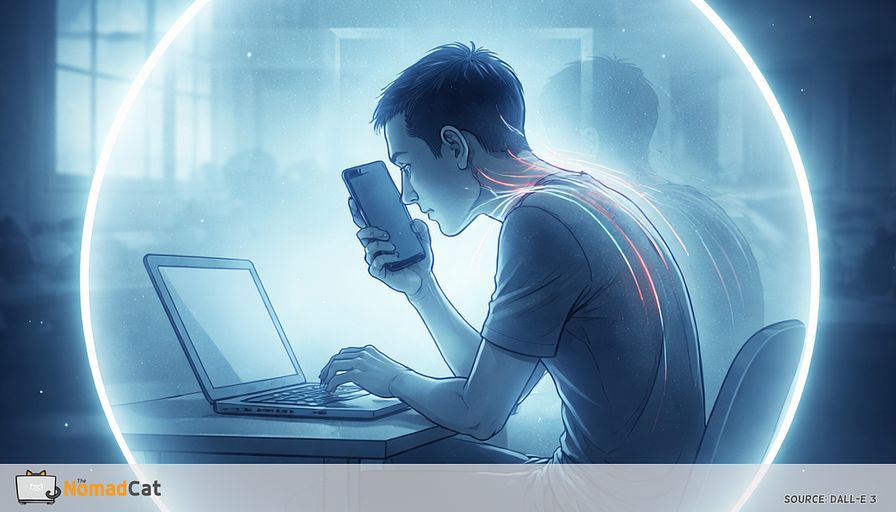
A remote workday can shrink to a 60 cm bubble.
Laptop at arm’s length. Phone even closer. Calendar tab pinned in the corner. That small green camera light quietly asking for “professional face.” Hours pass and the room basically disappears. Then, later, you notice the boring signs that somehow still ruin your evening.
- Dry eyes and the “why am i blinking so little” feeling
- Jaw tension you didn’t sign up for
- Shoulders slowly climbing toward your ears
- The 2-hour stretch where you barely moved, but you also didn’t notice
This article is here to explain why that happens without turning it into a willpower story. I’ve done enough long desk days across offices in beijing, berlin, and now lisbon to recognize the pattern: you feel “fine” until the evening, then the upper back tightness shows up like a receipt. The problem is often not your chair, or your discipline, or some moral failure called “bad posture.” It is a mode your body slips into when everything stays close and nothing around you interrupts it.
That mode has a simple name here: near-mode. Eyes lock on close targets, attention narrows, and the rest of the body follows. Remote work removes a lot of the automatic “distance pings” an office used to give you for free. Video calls add a social reason to stay frozen, because moving on camera can feel like you’re mentally checking out.
The goal is not to “move more” as a vague command that dies at 3 pm. It is to replace missing cues with small defaults that survive a meeting-heavy calendar.
You’ll get a practical map of what to change, without buying gear or building another system to maintain.
- Why the office naturally broke near-mode without asking
- Why remote fatigue can feel weirdly flat even with good ergonomics
- 4 tiny far-view cues that take 10 to 30 seconds and fit between real tasks
- How to make movement camera-boring so it doesn’t feel socially risky
- Simple ways to tell it’s working, plus a few stop rules for safety
Not perfect posture. Not a heroic routine. Just small prompts that bring back the accidental far looks and micro-shifts your body used to get all day, before work became a rectangle.
Your day shrank to 60 cm
Near mode is not just about eyes
Once you notice the radius shrink, it becomes easier to name what state your body slips into. Near-mode is simple: the eyes fix close, attention narrows, and the rest of the body quietly follows (not a diagnosis, just a useful label for a common work state). Like a camera zoom, you get detail, but you lose the wider scan. Under load, your brain filters out even more. The signs are boring but recognizable.
- Shoulders creeping up
- Jaw tension
- Shallow breathing
- Hands glued to the mouse
- The “i didn’t move for 2 hours” moment
It’s not “bad posture” as a personality trait. It’s an attention posture. Narrow focus tends to erase movement variety.
And when the work demands precision or social performance, the stillness starts to feel non-negotiable. You stabilize so your eyes and hands stay accurate. In meetings there’s also an etiquette layer. If the camera is on, people hesitate to shift, stand, or move out of frame because movement can look like distraction. That’s a big reason video calls can feel tiring in a strangely flat way.
The eye part matters too, but mostly as load management. Your blink rate can drop on screens, and the focusing system stays engaged at near distance. The annoying part is the timing. You can feel fine while you’re piling on load, then it shows up later when you finally look away.
So the practical question is not “how do i become disciplined.” It’s what used to interrupt near-mode automatically, and what replaced it at home.
The office broke near mode without asking
Distance pings you did not schedule
In an office, your gaze used to land far away all day, without planning it. You look past your monitor to a colleague across the room, to a whiteboard, to a window. You also walked to a meeting room, took a few stairs, or left the building to grab lunch. None of that was “exercise,” but it kept breaking the close-up loop.
Micro shifts that were too small to notice
That far look usually comes with a subtle body shift. Head lifts a few degrees. Neck rotates a little. Ribcage stacks a bit better over the pelvis. Then you settle again, slightly differently.
Before, these micro-shifts happened for free because the room kept pulling your eyes around. Remote work removes both inputs, and video calls add a social reason to stay frozen.
Why remote fatigue feels weirdly flat
This is why a perfect chair can still fail. The trigger is perceptual and social. If the day is mostly near targets, the system never gets an outside reason to change state, so near-mode becomes the default.
Meetings amplify it. You stay centered. You avoid looking away too long. You keep your hands kind of in frame. The easiest thing becomes acting like a still image that occasionally nods.
No guilt and no gear required
This is also where guilt can go. You can have decent ergonomics and still get that flat, drained feeling. Home setup quality matters, but it’s only one piece.
Instead of “move more” as a vague command, the better lever is replacing the missing cues with boring defaults that fit inside real work. Not expensive gear. Not a heroic routine. Just small prompts that bring back the accidental far looks and tiny posture changes you used to get for free.
Replace the missing cues
Design rules that survive a real calendar
A good cue has a tight spec, like any tool that has to work under load. The principle is simple: don’t chase steps during a meeting-heavy day. Restore far viewing plus a small re-orientation prompt, and let movement happen as a side effect.
Timers can work, but they often become background noise when your day already has 40 notifications fighting for attention. Event-based cues work better for a lot of people. They run when something meaningful happens. This matters when lunch is at the desk and meetings eat the day—because you won’t remember a timer anyway.
A far cue usually has 4 properties.
- Event-tied: attached to something that already happens (meeting ends, email sent, export finished)
- Short: 10 to 30 seconds
- Zero setup: no app, no equipment
- Socially boring: works even if someone is watching your camera tile
This is not posture policing. A common guideline is to change position every 20 to 30 minutes, but it’s not a magic law. A simple frame is “more position changes per hour.” Even 2 changes per hour is a practical start.
And yes, distance helps more than it sounds. A short look to a far target gives the near focusing system a moment off. The 20-20-20 rule is a useful reminder, not a perfect dose. The mechanism is what matters.
4 far cues that survive a meeting-heavy day
The doorframe look
This uses a threshold to mark “meeting state ended.”
- End the meeting and click Leave.
- Stand at a doorway or threshold and touch the frame or wall edge.
- Look at the farthest point you can see for 10 to 20 seconds, then sit back down.
In a small apartment, “farthest point” can be the balcony door, the building across the street, or just the far wall, as long as it is farther than the screen.
Phones tend to sit around 20 to 40 cm, laptops around 40 to 70 cm, so even looking to the end of the room is already a distance change.
Getting this cue 4 to 8 times per day is already a lot of interruptions to stillness. No tracking. Just reps.
The window token
Place 1 genuinely useful work item near a window or balcony door, so retrieving it forces a short walk and a far look 3 to 10 times per day.
Use an if-then script like this: “If i need the thing, then i walk to the window and look out before i come back.”
Good candidates.
- Charger cable
- Notebook you actually use
- Headset or dongle
- Water bottle
- Pen cup
Optional add-on if eyes get gritty late-day: when grabbing the object, add 2 slow, full blinks before walking back. Keep it gentle.
The loading screen rule
Knowledge work is full of tiny transitions and micro-waits. Use them.
Rule: when you are waiting (join call, export, build, page load), look far and slowly turn your head left-right once, then come back.
Keep the head turn small and neutral. On camera it usually reads as “thinking.” Stop if it makes you dizzy.
If you get 6 waits per day and each is 10 seconds, that’s 60 seconds of distance and movement you didn’t have to schedule.
The 2 point setup
No gear. Just 2 locations.
Pick Station A and Station B. Calls start at A and end at B, even if B is only 30 seconds of standing or leaning. B must be within 10 steps.
Examples.
- Desk and kitchen counter
- Desk and window chair
- Desk and bookshelf edge
- Desk and hallway console
Different station means different gaze line, small rotations, and different weight distribution. It breaks the single fixed near-point loop without needing a timer.
To keep the mindset practical, treat cues like debugging. Change 1 input for 7 days, watch boring outputs like end-of-day upper-back tightness or the urge to rub your eyes, then swap the cue if nothing changes.
Make movement camera boring
People freeze on calls for a normal reason. Evaluation pressure plus tight framing makes any shift look like “leaving.” A neutral setup change helps.
Move the camera a bit farther away and slightly higher, so your upper torso is in frame and you can lean back without disappearing. No gear required. Even pushing the laptop back 10 to 20 cm and tilting the screen up (books under the back edge if needed) can be enough.
If the tool supports it, reducing self-monitoring can also help.
- Hide self-view
- Use speaker view instead of gallery view
- Use brief camera-off moments when appropriate
How to tell if it is working
Watch for boring end-of-day signals, without turning it into a project.
- Less dense pressure behind the eyes after calls
- Shoulders creep up less often, or you notice it sooner
- Less urge to rub your eyes late afternoon
- Smoother first steps after long sitting
- Fewer evenings where the upper back feels glued
If you want a tiny measurement, time-box it.
Once per day at shutdown, rate neck or shoulder heaviness 0 to 10 for 5 days, then stop. I like logs: one number, once a day, then done. The goal is direction, not precision.
Stop rules that keep this safe and sane
If a far look or gentle head turn makes symptoms worse, shrink it or stop. Stop or modify if you get dizziness, a headache spike, sharp pain, weird vision changes, or anything that feels “off” in a way that’s more than plain tired.
Some eye symptoms are not screen strain. Sudden vision loss, flashes or floaters with a curtain effect, a painful red eye with halos, or new double vision needs timely medical evaluation.
Safety beats consistency. These cues are optional, and “gentle and brief” is part of the spec.
Remote work doesn’t just change where you sit, it changes what your eyes and attention do all day. When everything stays within 60 cm, near-mode quietly becomes the default. Dry eyes, jaw tension, shoulders creeping up, that flat end-of-day fatigue—none of it needs a willpower story.
The practical fix is not perfect posture or a heroic routine. It’s replacing the missing office cues with tiny, event-tied distance pings that fit between real tasks: a doorframe look after a call, a window token that makes you stand up anyway, the loading screen rule, a simple 2-station setup. Small inputs, boring on camera, but they bring back the variety your body used to get for free.
You might be interested by these articles:


Remote work stole your hallway breaks and your neck feels it

Make movement non-narrative on video calls

Your remote day needs friction to make movement normal again

Audio first gives your body permission to move on remote days

Clumsiness debt when the first stair feels wrong after 10 hours on screen

Edge Computing and IoT: Advancing Industrial Automation

Green Futures in Business Ethics




