
Abstract:
The article argues that many remote workers feel inexplicably “cooked” by early evening not because of bad posture, age, or insufficient workouts, but because remote work quietly removed a missing layer of everyday physical input that office life provided for free: “micro-loading,” the frequent, light, slightly awkward, often one-sided carrying of ordinary items like a laptop bag, coffee, cables, lunch, and notebooks through doors, stairs, and short transitions. This constant low-grade asymmetrical load (often a 3–7 kg one-strap commute) subtly trained grip, trunk stabilizers, shoulders, and balance in messy 30–90 second bouts—inputs that steps and a single 19:00 workout don’t replicate because they lack the grip demand, unilateral loading, and all-day distribution. When that carry layer disappears, common “weightless day” error messages show up: end-of-day shoulder heaviness, forearm/hand tightness from fine-motor-only work, and a low-back “invoice” the moment real objects appear (groceries, trash, suitcase, kid). The proposed fix is intentionally boring and low-friction: attach tiny carries to existing cues (e.g., after you click “Leave meeting,” stand up and carry one neutral object to another room), use “anti-efficiency” like a two-trip rule, keep loads light, switch sides deliberately (even swapping hands at doorways), and follow simple safety guardrails (no breath-holding, no pain spikes; stop for red flags like numbness, radiating pain, dizziness, or rapid worsening). To keep it from becoming another self-optimization project, the article recommends a 7-day “debug loop” using one blunt metric—such as a daily 0–10 discomfort score for shoulders or low back—looking only for a small downward drift that indicates normal tasks are starting to feel normal again.
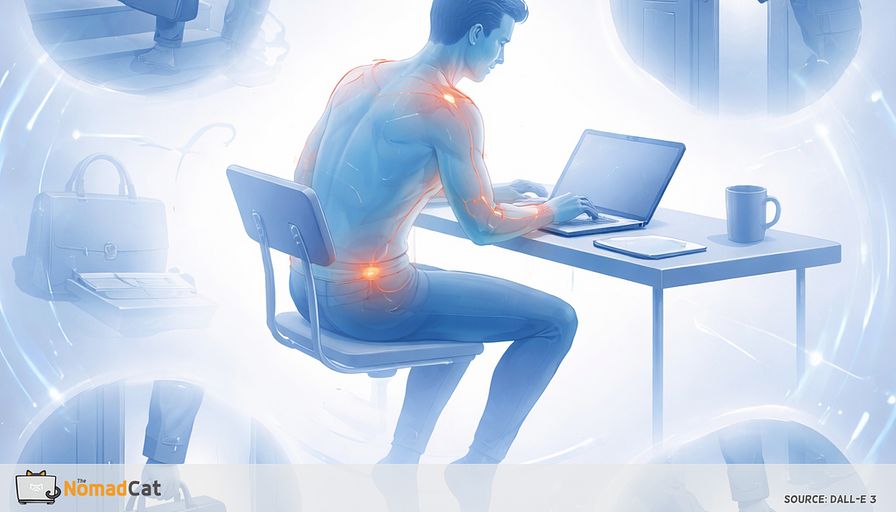
A lot of remote-work advice assumes your day is basically desk plus steps. Fix the chair. Fix the screen height. Stand up sometimes. Try a workout at 19:00 if you can. And if you still feel weirdly cooked by 18:30, it’s easy to blame posture, age, or “being out of shape”. Convenient, and also not very useful, this story.
There is a missing layer most people stopped noticing because office life used to handle it for free. All the tiny carries between rooms. Laptop bag, coffee mug, badge, cables, lunch, that one awkward stack of notebooks. Not training. Just frequent light load, slightly annoying grips, often on 1 side, with doors and stairs and stops. Then remote work quietly removed it. Your calendar looks normal. Your body logs say otherwise.
I’ve done the Beijing office years, then Berlin, then Lisbon, mostly at a desk. The first signal for me is boringly consistent: upper-back tightness that builds quietly until the first “real object” of the day feels heavier than it should.
This article puts a name on that gap: micro-loading. Frequent light carrying that is a bit asymmetric and a bit messy. You’ll see why 1-sided carry is not “nothing”, why steps and a single workout block don’t fully replace those inputs, and what the usual error messages look like when the day goes weightless.
Then it gets practical, without turning into a new project to manage. You’ll get low-friction carry patterns that survive back-to-back meetings, a couple of simple safety guardrails, and a 7-day debug loop using 1 blunt metric like a daily 0–10 discomfort score. The goal is modest: make normal tasks feel normal again, with small configuration changes.
The carry layer you stopped noticing
Micro-loading was everywhere in office life
Laptop bag, coat, coffee mug, notebook stack, badge lanyard, cables, lunch box. None of this felt like “movement”. It was just the normal choreography between rooms, through doors, up stairs, down the hall. Tiny bouts, lots of starts and stops. Not training, still load.
Remote-work guidance usually treats the desk as the full picture. A lot of public guidance focuses on activity targets and breaking up sitting. Workplace ergonomics pages are strong on screens, chair height, keyboard and mouse. Carrying and handling stuff exists too, but it often sits in a different bucket. So the gap is structural, not careless.
A practical definition helps. Micro-loading is frequent light carrying that is slightly awkward and often asymmetric.
Common traits
- light load
- imperfect grip
- 1-sided carry
- short bouts with transitions
A quick before/after makes it obvious.
Office morning: grab the laptop bag, coffee in one hand, badge tap, door push, a few stairs, another door, drop the bag, later pick it up again for a meeting room.
Remote morning: laptop opens already on the desk, water is three meters away, meetings stack, fridge trip is unloaded, then back to the same chair.
Same hours. Different inputs.
Even modest load changes the work your body has to do versus unloaded walking. Grip gets involved. Trunk stabilizers have to show up. Shoulders control position. Balance has to stay decent while you turn, stop, open a door, switch hands.
Office days used to run these little background maintenance jobs all day. Remote work quietly disabled a bunch of them. The logs look fine until real life shows up at 18:30 with groceries, a suitcase, a kid, or just taking out the trash. Then the body sends an invoice.
One-sided carry is not nothing
Asymmetry was the default setting
Old office life was basically 1-strap mode by design. Tote or laptop bag on 1 shoulder, coffee in 1 hand, phone in the other, badge tap, door push, pivot into the elevator. Not “bad posture”. Just normal.
For many commuters, the bag was not symbolic either. Often around 3–7 kg, and plenty of days drifting higher.
Unilateral carry changes mechanics in predictable ways. The loaded side usually works more. The trunk has to resist side-bending and rotation as you walk, turn, and stop. Most people also do the small, unglamorous stuff: a bit of lean, a slightly “held” shoulder to keep the strap from sliding, and less relaxed arm swing on the loaded side. Not destiny, just input.
And carrying is not a static “hold”. It is moving plus load plus interruptions. Starts and stops. Doors. Stairs. Tight corners. Switching hands because the phone rings. It is exactly the kind of messy 30–90 second work that disappears when your day becomes screen-only.
The weightless day error messages
Complaints that match the missing load pattern
After 8–10 hours of meetings and keyboard, shoulders can feel heavy anyway. Like a backpack that is not there. It is low-force work with high time-under-tension. Quiet bracing for hours. Confusing, yes.
Forearms and hands are often the quieter log line. Remote work is fine-motor rich and whole-body poor. Without grip variety from carrying things, the day becomes mouse grip and keyboard taps, plus maybe a brief walk to the fridge.
Then the low back often gets the invoice when the day finally demands a real object. Stand up, grab a grocery bag, take out the trash, and suddenly it feels like “too much” for something so normal. The mismatch is the point.
Why steps and 19:00 workouts do not patch it
Unloaded walking is excellent. Steps keep many systems happy. But it does not recreate 1-sided carry, grip demand, and those little turns with weight around doors and stairs. “Same steps” is not “same inputs.”
A good workout can also miss the timing problem. A workout is a batch job. Office life used to run tiny carry tasks all day, between meetings and rooms, so inputs were spread out. Small interruptions across the day often line up better with comfort than 1 heroic block.
That is good news, because the fix can stay small.
Carry cues that survive a calendar wall
Low-friction carry patterns
Treat it like an if–then plan so it runs by itself.
Options that tend to work in real schedules
- If you change rooms, carry 1 neutral object with you. Water bottle, notebook, charger pouch, small tote. 1 object, many excuses, zero planning.
- Use a little deliberate anti-efficiency. The 2-trip rule. Split 1 errand into 2 light carries instead of 1 perfect heavy carry.
- Attach it to a clean boundary after you click Leave meeting. Stand up, pick up 1 small item, walk it somewhere, sit back down. Think 30–90 seconds.
- Add 1–2 small errand tokens per day if meetings are sparse. Recycling, mail, restocking water, returning mugs. Keep it short and light.
If skepticism shows up, treat it like a small experiment with 1 simple metric. It’s easy to over-instrument this stuff if you’re a data person. Don’t. You only need a signal.
A practical one is a daily 0–10 discomfort score for 1 area such as shoulders or low back, logged for 7 days. It is blunt, but it can show a trend.
Make it camera-compatible
Video calls train people to freeze. Being watched makes you monitor yourself, so “sit still” becomes the default. The simplest workaround is timing.
Default rule
- Do the carry between calls, not during
If you must move during a call, keep the script short.
- “Back in 30 seconds, grabbing water.”
- “I’m listening, quick refill.”
- “Give me 1 minute, doorbell.”
Pre-writing the line is also an if–then trick. It reduces decision load, which is usually the real blocker.
Safety guardrails
Simple design principles
Tie carries to events that already happen, not motivation. Kettle on. Meeting ended. Lunch finished. Package at the door. Bathroom trip. Stable cues beat “try harder” when the calendar gets rude.
Keep the dose small and spread out. Many tiny carries beat 1 heavy effort. Variability beats precision. The goal is to replace missing sprinkles, not run a program.
Keep loads light and switch sides on purpose. A simple trick is to swap hands at the doorway so you do not recreate the same asymmetry all day.
Safety stop rules
Easy means no strain face, no breath-holding, no pain spikes, no white-knuckle grip. If you’re making the same face you make when a production deploy goes sideways, the load is too high for this use case.
Stop if any of this shows up
- numbness or tingling
- sharp or radiating pain
- dizziness or chest symptoms
- new weakness or clumsiness
- fast escalation over 24–48 hours
More cautious if pregnant or early postpartum, post-surgery, dealing with hernia or pelvic floor issues, uncontrolled hypertension, grip-aggravated nerve symptoms, or balance problems.
Simple signals and a 7-day debug loop
Small logs that mean the patch is working
Pick 1 quiet error log and rate it at the same time daily. Success is usually less noise, not a dramatic upgrade.
- less end-of-day shoulder heaviness
- fewer forearm tightness episodes
- standing up feels less rusty
- groceries feel less irritating
A minimal version is 1 daily 0–10 rating for shoulder or neck fatigue. 7 points is not big data, but it can show direction without turning your life into another dashboard. The control variable is the timestamp, not the app. If you already wear a Polar H10 or a basic Decathlon watch, don’t add a new dashboard—just keep the same 0–10 note.
If nothing changes, it is not a moral failure and it does not mean you did it wrong. There are other big inputs like sleep debt, workstation setup, and meeting stress. The carry layer is only 1 knob.
The 7-day carry experiment that survives real weeks
For 7 days, use 1 cue and keep everything else steady.
Example cue
- After every call, carry 1 small item to the kitchen before sitting again
At the end of the week, compare the daily 0–10 ratings. Any small downward drift counts, because the input is small. Judge it by comfort logs, not by step counts.
If symptoms worsen or any red-flag pattern shows up, stop and get advice. Otherwise keep the part that helped and delete the rest. Treat it like a reversible configuration change. Your day is not too soft. It is just missing a small input.
If your remote day is 8 to 10 hours of calls, tabs, and desk lunch, it makes sense that you can hit your step goal and still feel oddly cooked by 18:30. The missing piece is not motivation or posture policing. It is the carry layer office life used to sprinkle in for free: micro-loading. Small, slightly awkward, often 1-sided carries that wake up grip, trunk, shoulders, and coordination in short bursts.
Most days don’t need more discipline. They need 30–90 seconds of missing friction, scattered in the cracks between calls.
You might be interested by these articles:


Your neck is carrying the groceries after a desk day

Remote work removed the handles and your hands are paying for it

Your first steps feel wrong because remote work killed the warm up layer

Your 18:00 stiffness is a config bug fix it with micro-variability

Your remote day is missing 60-second cardio spikes

Enhancing Offices with IoT Tech

Advancing AI with NLP Breakthroughs




