
Abstract:
The article argues that end-of-day desk “tightness” is usually a predictable exposure problem caused by unnoticed, low-grade rotation and long periods of near-focus stillness—like a background process—rather than a dramatic structural issue, and it shows how to make that hidden workload visible and reduce it with small changes that don’t turn the day into a posture project. It highlights how slightly offset monitors, a phone parked behind the mouse, or a notebook fixed at a 30° angle can create real accumulated rotation as you keep your chair and hips “camera-ready” while your neck and ribs do constant micro-swivels; over time, reduced movement variability, shallow breathing, and arms-forward work can make rib rotation less available so the body “borrows” motion from the neck, low back, or shoulder, leading to late-day signals like neck-cracking urges or awkward reach-backs for a bag. To counter this, the author—who has worked late nights at desks in Beijing, Berlin, and Lisbon and jokes that a spouse’s “sit straight” reminder lasts about three minutes—recommends a simple 17:00 “rotation audit” (is the sternum coming with the turn or is the neck doing it), a brief 25-second seated chair-turn micro-move repeated a few times between meetings, and modest layout/habit tweaks (center the primary monitor, move frequent items into the main reach zone, use a headset) so rotation is shared by chair/hips/ribs instead of dumped into one segment, while also listing clear guardrails for when worsening pain, neurologic symptoms, or concerning dizziness/headache patterns should prompt medical assessment.
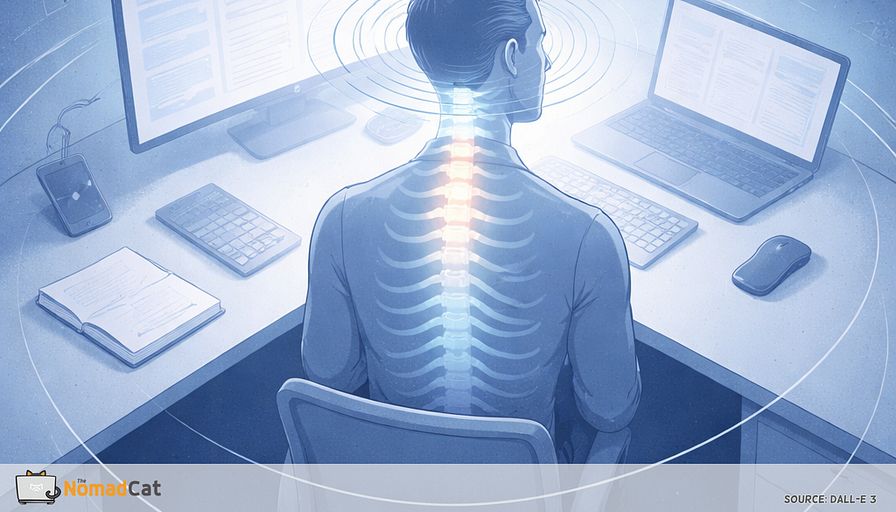
You can sit at a desk all day and still rack up a surprising amount of rotation. Not the dramatic kind where you notice you moved. More the small, constant swivel reaches that feel “efficient” in the moment. Side monitor a bit off. Phone somehow behind the mouse. Notebook parked at a permanent 30° angle. You stay camera-ready. Your chair stays still. Your neck and ribs do the micromovements all day, like a background process you forgot to quit.
The point of this article is simple. Make that hidden workload visible, then lower the dose without turning your workday into a posture management project. You will get a clear explanation of why near-focus work makes your body freeze into fewer shapes, why “tight” often means “lost options”, and why end-of-day stiffness is usually a boring exposure problem, not a dramatic structural one.
Here is what we will cover, without drowning you in anatomy or studies.
- Why slight monitor offset and repeated swivel reach can count as real rotation exposure
- How long screen attention tends to shrink movement variability and increase static loading
- What happens when rib rotation goes a bit offline and motion gets “borrowed” by your neck, low back, or shoulder
- A quick rotation audit you can do in about 10 seconds to spot the pattern at 17:00
- A small seated chair-turn input that takes about 25 seconds and fits between meetings
- Layout and habit tweaks that reduce background twist without banning dual monitors
- Guardrails for when to stop experimenting and get assessed
One grounding detail from the author, because this is not theory-only. The author has spent most of adult life at a desk in Beijing, Berlin, and now Lisbon, often past midnight. Not in pain, but the early log message is upper-back tightness that builds quietly until it forces movement. Also, the wife reminder to sit straight usually works for about 3 minutes. So the win condition here is not perfect posture. It is noticing the logs earlier, and making small changes that still work on a heavy calendar.
The swivel you do not count as rotation
Swivel reach is real workload
Your desk can ask for rotation all day without ever feeling like you are “moving”. 1 screen is slightly off-center, the second lives on the side, the phone is somehow always behind the mouse, and the notebook sits at 30° like it’s part of an aircraft checklist. Very efficient.
Workstation research suggests lateral monitor offset increases head and trunk rotation exposure. In plain terms: if your main screen is even 10–20 cm off center, you can spend hours slightly turned without noticing (Sommerich et al.; Ijmker et al.). Posture exposure is not just big turns. It is time spent slightly rotated, over and over.
It feels normal because you are optimizing for speed and low disruption. Keeping the chair and hips fixed is quicker than moving your base every time. It also looks more “camera-ready” in meetings, which quietly rewards stillness.
Modern computer work tends to reduce movement variability and increase static loading, so this is less a bad habit than a predictable response to the task (Straker & Mathiassen, 2009). It feels faster now, it costs later. And the bill arrives later, usually when you try to do a normal turn that used to feel easy.
Late-day signals
- the urge to crack your neck to “get something back”
- the side monitor suddenly feeling annoyingly far
- reaching behind for a bag and thinking “ok that was… not smooth”
Neck and shoulder discomfort research keeps finding patterns like sustained activation and reduced movement variability in symptomatic office workers (Szeto, Straker & O’Sullivan, 2005; Madeleine, 2010).
A useful reframe is to stop thinking “tight” and start thinking “lost options”.
Think of it like software fallback. When 1 option goes partly offline, the workload reroutes elsewhere until something gets overloaded and starts throwing warnings. Discomfort is not the same thing as damage, and scary explanations can make symptoms worse (Moseley & Butler).
Near focus makes you freeze
Attention mode narrows posture
Once you are in near-mode, other things change too. Sustained screen attention tends to pull posture into a quieter, narrower shape. The head drifts forward, the upper back creeps into more flexion, and you stay there longer than you think.
This is not a flaw in you. It is the normal time-on-task drift in computer work: you move less, and you hold more (Straker & Mathiassen, 2009). A common sign is that when you finally look away, your neck feels like it has a little loading spinner before it turns smoothly again.
Small breathing changes can make rotation feel less available
Lower blink rate and shallower breathing during intense screen work may contribute to less ribcage movement over a day. You know the feeling: a meeting ends and you realize you haven’t taken a real breath since it started. If something moves less for 8–10 hours, it often feels less available at 18:30.
Arms forward shifts the shoulder blade base
All-day arms-forward work changes what “reach back” feels like. When your hands live on keyboard and mouse, your shoulder blades tend to slide forward and tip a bit, so “reach back” feels tighter and less smooth late day (Szeto, Straker & O’Sullivan, 2005).
Think of the scapulae as the sliding base under the arm. When that base glides less cleanly, behind-the-back or reach-back motions can feel like the shoulder joint has to take more of the angle. Hand-behind-back tasks need coordinated shoulder-blade-on-ribs motion, not just “arm rotation” (McClure et al.).
Offset is the dose, variability is the antidote
The goal is not to ban dual monitors. It is to reduce the sustained offset dose and add variability back in. In exposure terms, the problem is background load: a small rotated position running all day like a CPU process you forgot to quit.
Centering the primary screen can reduce sustained rotation exposure (Sommerich et al.). Ergonomics guidance is blunt about the rest
- avoid twisting your torso
- turn the chair and your whole body instead (OSHA Computer Workstations eTool)
Small changes, not a rebuild.
When rib rotation goes offline
Borrowed motion is the default
The demand does not disappear just because ribs contribute less. You still need to look, reach, and turn, so your body borrows rotation from somewhere else, usually the neck, the low back, or the shoulder complex. Clinically, people describe this as cervical-led vs thoracic-led turning. It is an observation, not a diagnosis.
Neck becomes the rotation engine
A common pattern is neck-led turning. The head turns first, the sternum stays facing forward, and the last part of the motion is a little side-bend or chin-jut like your neck is trying to finish the job alone.
Over a long desk day, this often matches end-of-day “tight neck”, upper trap burn, and sometimes headache-ish annoyance, especially when movement variability stays low (Madeleine, 2010). It is common and usually not alarming. But if pain is severe, progressive, or comes with neurologic changes, get evaluated rather than just stretching harder (Cohen & Hooten, 2020).
Low back takes the twist when the base stays fixed
If the pelvis stays glued to the chair and you keep reaching to the side or behind you, the lumbar area can become the twist point. When rotation gets paired with a little extension to “make room”, it can feel like a pinch when you stand up or rotate fast after sitting.
Biomechanics studies show asymmetric twisting tasks increase L5/S1 loading indicators, especially when reach or load is added (Marras et al.; Wilke et al., 1999). Desk translation: if you need something to your side or behind you, turn the chair a little first so your low back isn’t the only swivel joint. Boring ergonomics wins. Avoid torso twisting. Turn the chair or whole body instead (OSHA).
The shoulder tries to reach back from a worse base
When trunk and ribs contribute less, the shoulder gets asked to do “reach back” with less help from shoulder blade glide. If coordination is off, reach-behind can feel pinchy in the front of the shoulder, maybe with clicking late day.
A simple reader-level clue: if gently pulling your shoulder blade a touch back and down makes the pinch calmer, that suggests the “base” is part of the story. That does not prove one root cause, it just tells you where the system is borrowing motion today.
A 10-second rotation audit
Do it like checking logs
Treat it like a quick check, not a verdict. The goal is signal: are the ribs participating, or are the neck and low back doing overtime. Threat language can amplify symptoms (Moseley & Butler).
Also, rotation angles are noisy unless you measure carefully, so a simple qualitative screen is fine.
- Sit how you usually sit, feet on the floor.
- Keep hips heavy and facing forward, no bracing.
- Gently turn to look over 1 shoulder, small range, let the chest come with you.
- Return to center, then repeat on the other side.
Reduce the result to cues you can remember at 17:00
- does the sternum move with the turn, or stay parked while the head does all the work
- does it feel smooth through the ribs, or like a hard stop then neck crank
- any compensations
- pelvis drifting on the chair
- low back arching to “find” rotation
- arm pulling on the desk for leverage
- common cheat that deserves a small laugh is turning your whole body by dragging the mouse hand and rotating the chair 2 cm like it counts
Then label it brutally simple
- ribs online
- neck doing it
Optional is logging only the 17:00 version for 7 days to see drift. End-of-day checks tend to be more sensitive to desk exposure because discomfort and stiffness often build across the shift.
What the result means and what it does not
Even if the audit looks ugly, it does not automatically mean damage. Asymmetry is common, and workload matters more than hero posture. A day of back-to-back calls where you barely stand up will often make the pattern worse. That fits the static exposure framing in desk work research (Straker & Mathiassen, 2009).
1 exception is worth stating. Pain is not automatically damage, but if symptoms are severe, progressive, or paired with neurologic changes, get assessed instead of trying to out-stretch it (Cohen & Hooten, 2020).
If you get true spinning dizziness triggered by head turns plus focal neurologic signs, severe gait imbalance, or a new severe headache or neck pain, treat it as triage, not mobility. Brief position-triggered spinning without neurologic deficits often fits benign positional vertigo patterns (AAO-HNS BPPV guideline, 2017). Red-flag features raise concern for central causes (GRACE-3, 2023) or vascular problems (AHA/ASA cervical arterial dissection statements).
A 25-second chair turn that still counts
A small unweight and rotate input
If you’re chasing a number, you’ll overdo it. Keep it small. The point is to reintroduce a little rib and shoulder-blade option so the next turns are not all paid by the neck. Brief, frequent microbreaks can reduce discomfort in desk workers without hurting productivity in controlled studies (McLean et al., 2011; Galinsky et al., NIOSH).
- Stay seated, feet down, hands light on thighs.
- Slide 1 sit-bone slightly forward so the pelvis unweights a bit.
- Turn ribs just a few degrees to that side, like oiling a hinge, not twisting.
- Return to center.
- Do 2 reps each side.
Keep it comfortable. No sharp pain, no forcing end range, stop if symptoms worsen or start to radiate.
To make it fit reality, attach it to events that already happen. Event-based cues beat timers on meeting-heavy days
- after you hit Send
- after a tab switch
- when a build finishes
- when a meeting ends
- when you stand to refill water or coffee
Win condition is boring. You did it a few times, at low effort, and you did not lose output doing it.
The moments that sneak-load your spine
Most of the spike load comes from fast turns on a stiff base
- twisting to stand after a long call
- reaching behind for a jacket or bag
- turning to talk while hands stay parked on keyboard and mouse
The evidence is stronger for awkward posture as a short-term trigger for acute low back pain than for any 1 single magic moment (Steffens et al., 2015). Still, the pattern is familiar because the load is fast and the base is fixed.
A tiny rule reduces most of it without adding time. If you twist, move the chair or feet too, so rotation is shared across hips, swivel, and ribs instead of dumped into 1 segment. Turn the chair 10° first, then reach. This matches ergonomics guidance and biomechanics work showing twisting increases lumbar loading indicators, especially with reach (OSHA; Marras et al.).
You can also reduce background rotation dose with 1 layout change
- center the primary monitor and let the side screen be truly secondary (Sommerich et al.)
- move the most-used item into the primary reach zone so you stop doing the same small twist 200 times (NIOSH/CDC ergonomics principles)
- if calls make you rotate and clamp the phone, use a headset so your neck is not the swivel joint
Signals that say it is working
Progress that shows up at 17:00
Use 1 tiny metric that takes 5 seconds. “Better” can look like
- less neck grab on side turns
- easier reverse when looking behind before standing up
- less sketchy reach-back for jacket or bag late day
At 17:00, ask
- when I turn, are my ribs coming with me, or is my neck doing it
Log ribs online vs neck doing it, plus optional 0–10 tightness. You are watching drift, not running a clinical trial. Microbreak-style inputs tend to reduce discomfort over days to weeks, and VDU studies found discomfort can improve without obvious productivity harm (McLean et al., 2011; Galinsky et al.). What not to expect is a magical new morning baseline after 48 hours.
Guardrails that keep this calm
For most desk workers, mild stiffness and end-of-day tightness fits a boring pattern. Long exposure, low variability, lots of near-focus, not much movement. Small changes often help, and guidelines generally support staying active and not treating your neck and back like fragile glass (NICE NG59).
Get assessed (instead of stacking more desk tricks) if any of these buckets show up:
- Nerve-type symptoms getting worse: new or worsening numbness/tingling, or radiating arm pain that’s clearly progressing over days (Cohen & Hooten, 2020; NASS)
- Strength, coordination, or balance changes: progressive weakness, new hand clumsiness, or new gait imbalance (urgent, same day)
- Severe or unusual “don’t mess with this” symptoms: new severe headache or severe neck pain (especially after minor strain), severe dizziness with focal neurologic signs, major trauma, fever/systemic illness feel, unexplained weight loss, cancer history, or escalating night pain (prompt urgent or medical review; GRACE-3; VA/DoD LBP CPG 2022; NICE NG59)
If none apply, a 1–2 week gentle trial of micro-inputs plus exposure reduction is reasonable, then reassess like any system change. Plan, run it, review the logs. If it is not improving, or it is slowly worsening, getting assessed beats stacking more tricks.
Desk stiffness is rarely a mysterious flaw. It is usually an exposure problem hiding in plain sight. A slightly off monitor, the same swivel reach 200 times, and long near-focus blocks that shrink your movement options until your neck and low back start paying the rotation bill. The fix is not perfect posture (the wife reminder lasts about 3 minutes anyway). It is making the background twist visible, then lowering the dose with small, boring changes that fit a real calendar.
Try the 10-second rotation audit at 17:00. If it looks like “neck doing it”, add the 25-second chair turn a few times between meetings, and nudge your layout so your base moves with you. Most people do not need a new program. They just need to stop paying rotation interest on tiny twists all day.
You might be interested by these articles:


The 30 second range refeed that stops the 18:10 bug report after desk days

When your mid-back stops clocking in on desk days

Your neck is doing overtime for your mouse hand

Why your seatbelt reach fails after a mouse heavy day

Your watch logged the workout but your shoulders still filed a bug report at 18:00

Industrial Robotics Future Trends

Your steps are fine but remote work removed collision physics




