
Abstract:
The article explains why desk work can feel effortless in the morning yet leave you with nagging neck and shoulder tightness by evening, arguing that this is usually a “system problem” rather than bad posture, the wrong chair, or a personal failing. Its core idea is that hours of high-accuracy mouse or trackpad tasks—tiny clicks, dragging, pixel-level UI nudges, timeline scrubbing, spreadsheet audits, inbox triage, and constant micro-corrections—quietly recruit a chain of bracing from the grip to the forearm to the shoulder and finally the neck, especially when time pressure makes the body stiffen for precision; because the effort is low-level but continuous, real rest never arrives, like a laptop fan that won’t shut off because one tab keeps waking the CPU. Instead of “hero posture” or an ergonomics overhaul, it recommends noticing early “log files” (a pinchy death-grip, wrist extension, hovering elbow, subtle shoulder-forward drift, head turned toward the active screen) and using small interventions that fit real workdays: a 10–15 second “de-grip and re-seat” at natural breakpoints (release the mouse, uncurl fingers, rest the forearm, take two calm breaths, let the shoulder blade settle), plus simple variability such as pulling the mouse closer, using shortcuts briefly, tweaking pointer speed to reduce micro-correcting, and aiming for a few quick position changes per hour. It also sets clear boundaries for when to stop tinkering and get checked (persistent tingling, worsening weakness, shooting arm pain, severe night pain), concluding that the practical win is less grip load and more movement variety so your neck isn’t “hired as background stabilization” all day—and that being able to work for hours without moving isn’t a superpower, just a well-marketed bug.
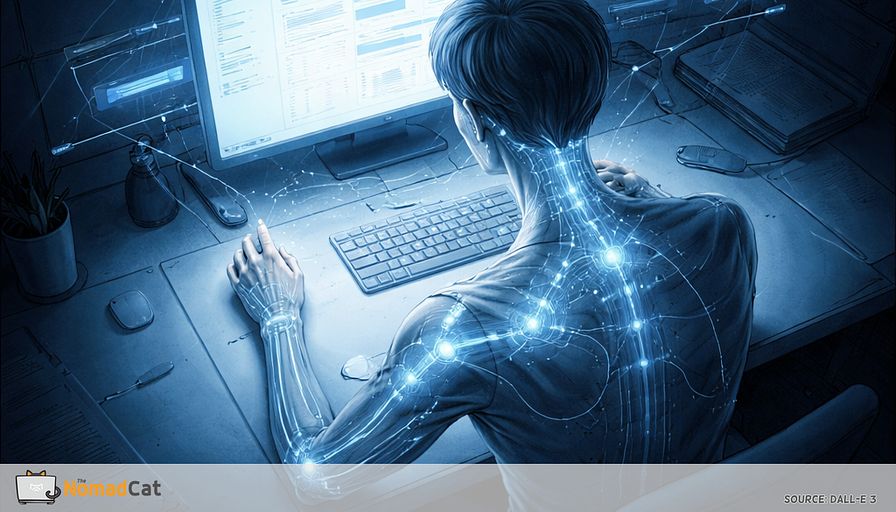
At 9 am, desk work feels almost weightless. A few emails, a few tabs, a few tiny clicks. Nothing you’d call “effort.” Then around 7 pm your neck is weirdly tired, like it’s been doing a second job all day and forgot to invoice you.
If that sounds familiar, it’s probably not because you failed at posture. And it’s probably not because you didn’t buy the right chair. A lot of the load comes from something smaller and more annoying to fix on paper. Precision hand work. The constant micro-corrections that look harmless, but keep the whole stack above your wrist slightly “on” for hours.
I’ve done the version of this across offices in Beijing, then Berlin, and now Lisbon—plus workations around Europe on bad chairs and worse desks. Different cities, same pattern: the hand looks busy, and the neck quietly pays for it later.
If you’ve been doing 10-hour desk days, bouncing between meetings, eating lunch near the keyboard, and watching work spill into the evening, this is a pretty normal outcome. Also, yes, a lot of “fix your posture” content has a strong productivity-hack vibe. This isn’t that.
The point here is simple. End-of-day neck and shoulder tightness is often a system problem. Not a character flaw. And the changes that help are usually small enough to fit into a real day where breaks are more theory than reality.
What we’ll cover
- Why tiny, high-accuracy mouse and trackpad work can recruit the shoulder and neck over time
- The kinds of days that quietly spike the load, like audits, triage, timeline scrubbing, and endless UI nudging
- Early “log files” to notice before it turns into a nightly stretch emergency
- What is likely happening under the hood, using simple feedback-loop logic
- The smallest interventions that often pay back, like a 10 to 15 second de-grip and re-seat, plus more position changes per hour
No hero posture. No big overhaul, just that. Just a cleaner configuration, so your neck stops being hired as background stabilization for your hand.
The tiny hand task that makes the neck work late
The mismatch that shows up at 7 pm
The reason is often not your chair. It’s the kind of control your hand is asked to deliver for hours—and how little true “off-time” that task contains.
Computer work often means low-level muscle activity held for a long time. It sounds harmless. But “low-level plus long duration” is exactly the kind of setup that can lead to fatigue and discomfort over time (Waersted, Hanvold & Veiersted, 2010; Visser & van Dieën, 2006). Plain version: if you never fully go “off” for even 10 seconds, the meter keeps running.
This is the small hand problem. Precision work looks light, but it asks for constant stability. So the body pays a small tax, continuously, above the hand. It’s not a personal failure. It’s a normal pattern in desk work where the task doesn’t include real rest.
Why precision work recruits the neck
Think about a classic desk moment
- scrolling fast through a long doc
- selecting tiny UI targets
- click-and-hold while moving something by 3 pixels
- nudging a design element “just a bit”
It’s not heavy lifting. But it is high-accuracy work. And when accuracy matters, the body tends to add support so the hand can be precise.
The bill comes later. You can feel fine at noon and stiff at dinner because the exposure was small, but it never stopped.
Walk up the chain
- the grip gets a bit more serious
- the forearm firms up
- the shoulder becomes less loose and more locked-in
- the neck joins in, quietly, to keep things steady
A useful way to think about it is like a control system that increases stiffness to reduce wobble. People often stiffen up when stability is challenged (Burdet et al., 2001).
Now add the realism layer. Attention and time pressure.
When the work becomes “don’t mess this up” work, shoulder activity tends to creep up. Research suggests mental stress and time pressure can increase trapezius activity during computer tasks (Visser & van Dieën, 2006). On video, the day looks the same. Internally, it costs more.
The days that quietly spike the load
When the work is basically tiny corrections
Some days are high-correction days where the mouse never gets a real break
- spreadsheet audits
- ticket grooming
- timeline scrubbing
- inbox triage
- research tab churn
It looks like nothing. It’s hours of micro-moves.
Fatigue also changes the loop. Accuracy gets a little worse, corrections go up, and the body tends to brace more, not less. This fits the general fatigue pattern in sustained low-level work (Visser & van Dieën, 2006).
Short breaks tend to reduce fatigue and discomfort without obvious performance loss (Wendsche et al., 2016).
Laptop-only days can push the pattern too. Trackpads often pull you into finer finger control and awkward wrist angles. Two concrete checks that matter more than any standard name: if you have to “pinch” to click or drag, the device is too far/small or the sensitivity is too low; and if your wrist is bent up all day, change the setup so the forearm can be supported and the wrist can stay closer to neutral. Not “perfect”, just workable.
The early log files before it hurts
3 places to watch without overthinking it
This is not a diagnosis. It’s just noticing the early logs.
1) The hand and grip
Look for a pinchy thumb and index, pale knuckles, or that “holding the mouse like it might escape” grip. Click-and-hold and dragging are classic triggers. A simple check question
- could you loosen 10% and still control it
2) The forearm and wrist
If the wrist lives in extension or is angled off neutral, forearm muscle activity tends to rise during pointing tasks, and those postures can sit there for long chunks of the day.
Common cause is a mouse that sits too high, or laptop trackpad days.
3) The shoulder and neck drift
Look for small drifts, not cartoon shrugging
- elbow hovering off the desk
- shoulder subtly forward
- shoulder blade that feels stuck
- head rotated toward the active screen
People with neck symptoms often show different posture and muscle activation during office tasks (Szeto, Straker, O’Sullivan). Low-variation patterns can also make fatigue more likely (Madeleine, Voigt, Arendt-Nielsen). The useful takeaway: if you notice the same drift showing up every time you scroll fast or do tiny nudges, treat it as a cue for the 10-second re-seat—not a cue to “try harder” and hold yourself in place.
What is probably happening under the hood
Micro grip plus low variety is the real exposure
A desk day is not high effort. It’s also not truly idle.
The shoulder and neck stay lightly on, waiting for the next tiny correction. The issue is that off-time never really arrives.
Here’s the loop in plain, dumb logic:
- Accuracy demand goes up (tiny targets, time pressure).
- Grip and “stiffness” up the chain go up (forearm, shoulder, neck).
- As fatigue builds, micro-errors and extra corrections increase.
- More corrections push stiffness up again, and the loop keeps turning.
Those short rest gaps matter a lot, and computer work tends to reduce them (Veiersted et al., 1993; Waersted, Hanvold & Veiersted, 2010).
It’s like having a laptop fan that never stops because one tab keeps waking the CPU.
Precision tasks also push the system toward extra stiffness to reduce wobble. Dragging a tiny slider while trying not to mess it up often makes everything above the wrist more braced. Common pattern, not a universal law.
This is load management not damage
Scary narratives do not help. Neck and shoulder discomfort is often a normal output of a system that ran too long with too few breaks, not proof something is broken.
Many guidelines lean toward staying active and managing load, instead of chasing 1 perfect posture (APTA/JOSPT Neck Pain CPG, 2017). Pain is real, but it isn’t a clean damage meter (IASP, 2020). Imaging findings are also common in people without pain, so scans often explain less than people think (Brinjikji et al., 2015).
The smallest change that often pays back
A 10 to 15 second de-grip and re-seat
Not a stretch routine. More like a quick state change that fits inside boundaries you already have. Call ends. File saved. Tab closed. The goal is it looks like nothing happened.
This is the kind of thing that kept me functional on those “bad chair, worse desk” days—because it doesn’t require a clean setup, only a moment where the hand actually stops doing the job.
Microbreak research is generally neutral on performance and can improve discomfort (Dababneh et al., 2001; Wendsche et al., 2016).
A tiny script
1) Put the mouse down. Stop the click-and-hold.
2) Uncurl the fingers. Let the grip go to zero for 1 second.
3) Let the forearm rest on the desk or armrest, not hovering. Forearm support can reduce trapezius activity and discomfort during mouse work (Rempel et al., 2006).
4) Take 2 calm breaths. No magic, just a small downshift out of busy mode.
5) On the exhale, let the shoulder blade settle down without squeezing it back.
Quick guardrails
- prefer forearm support over pressing the wrist crease on a hard desk edge
- keep the wrist roughly neutral, avoid living bent up all day
- avoid dramatic shoulder pinning. Less effort beats perfect posture
Micro variability that is not an ergonomics project
The win condition is simple
- less grip load
- more positions per hour
A cadence that often works is a small change every 20 to 30 minutes, so 2 to 3 quick pauses per hour (Galinsky et al., 2000; Wendsche et al., 2016).
3 no-purchase options
- Use keyboard shortcuts for 2 to 3 minutes so the mouse hand can fully idle.
- Move the mouse closer to midline so the elbow stays near the body, with forearm contact.
- If it fits the task, alternate briefly with the trackpad for a few minutes, mainly to change the pattern. Evidence on short-cycle alternation is limited, so treat it as variety, not a guaranteed fix.
A quick check that tells you if this lever matters
Run a small experiment instead of a big overhaul
Keep it repeatable, not perfect.
Do 1 quick de-grip and re-seat, then check if the neck feels a bit quieter in the next 30 to 90 seconds, or if the shoulder stops feeling busy. Plausible, not guaranteed. Most studies look at effects over work blocks, not exact seconds (Wendsche et al., 2016).
If you want 1 lightweight number, keep it human:
- 0–10: how loud is the neck right now?
Check right before and right after 1 to 2 quick pauses, or at end of day. If the number does not move, don’t try harder. Change the input
- add forearm support
- pull the mouse closer
- tweak pointer speed so you stop micro-correcting
- place the pause at the exact moments you drag and click-and-hold
Boundaries that keep this boring
When it is worth getting checked
If any of these show up and stick, it’s usually smarter to get clinical advice rather than keep tweaking mouse settings (NICE NG127; NASS, 2010)
- persistent numbness or tingling
- progressive weakness, or dropping objects
- strong pain shooting down the arm
- severe night pain that does not ease
- symptoms spreading or clearly worsening week to week
Progressive neurological change deserves prompt assessment, not another round of desk debugging.
Most desk workers are not in that category. End-of-day tightness that improves with movement often fits a load-management problem you can address conservatively first (APTA/JOSPT, 2017).
The practical win condition
Two outcomes make it easy to know you’re on the right track
- reduce grip load
- increase positions per hour so the neck is not hired to stabilize the hand all day
Mouse-heavy days are where to judge it. The best signals are low-noise signals:
- less one-sided trapezius fatigue on high-scroll, high-correction days
- less need for an end-of-day big stretch just to feel normal again
No chair pilgrimage required. The point is not to fix desk life. It’s to lower the background process cost so the day ends quieter. And yes, being able to work all day without moving is not a superpower. It’s just a bug with good marketing.
If your days are 10 hours of tabs, meetings, and desk lunches, it makes sense that the work feels “light” at 9 am and your neck invoices you at 7 pm. The main takeaway is not hero posture or a chair quest. It’s the small, high-accuracy hand work that keeps the whole stack above your wrist quietly switched on, especially on high-correction days and under time pressure.
The good news is the fix can be small too. Lower the background cost by reducing grip, adding forearm support, and increasing position changes per hour. A 10 to 15 second de-grip and re-seat at natural breakpoints is often enough to create real rest gaps, without turning your day into an ergonomics project.
Mouse-heavy days are the audit. If the neck gets quieter after two or three real “off” moments, you found the lever.
You might be interested by these articles:


The 10 second wrist reset for post laptop kitchen pain

Direction matters fix the one sided desk day

The elbow invoice after a nothing desk day

The hidden desk twist that makes your neck do overtime

Your watch logged the workout but your shoulders still filed a bug report at 18:00

Transforming Workspaces: How European Startups Boost Employee Well-being with Tech

The Diverse Uses of Blockchain




